Thursday, 24 May 2007

Help Google Improve Adsense, Get an Apple iPod in Return

Google Adsense ipod giftGoogle is inviting Adsense publishers to participate in a "Adsense Satisfaction survey" and offering them a chance to win an 80 GB video iPod in return. Four Adsense users per billing country will be randomly selected on 15 June 2007.

Other than the attractive prize, this Adsense Satisfaction survey offers an insight into the upcoming features and the future direction of Adsense program.

Google is trying to find what percentage of your online advertising revenue is coming from Adsense, what other ad networds are you a part of and what kind of page-views does your site receive every month.

Here are a couple of questions from the Adense survey that are particularly interesting:

How interested would you be in the following capabilities if they were offered within Google AdSense?

Managing other publishers' AdSense accounts for them
Paying for phone support
Selecting the types of advertisers that appear on your site
Applying AdSense earnings towards AdWords marketing
Specifying your own ad formats and sizes
Gathering information about your visitors
Selecting ad categories to appear on your site

Site targeting is a feature that enables AdWords advertisers to list specific sites on which they would like to advertise. Which (if any) of the following new features would most increase your satisfaction with site targeting? Being able to:

Give advertisers more information about your site
Allow advertisers to see how their ads perform specifically on your site
Choose which advertisers can appear on your site
Offer your website inventory at a more granular level than domain
Set a minimum CPM for ads on your site

Of your ONLINE ADVERTISING revenue, what percentage comes from each of the following sources? Your answers should sum to 100%.
% from AdSense
% from Other contextual/text ads
% from Banners/Pop-ups/rich media
% from Site sponsorships
% from Referral/affiliate programmes
% from Other (please specify)

The email came from the Global Customer Insights Team at the Google Ireland office. If may be reaching your inbox shortly. [Photo: Shimon]

Autorun Presentations or Software Programs from USB Drive

Anil Narwani from Wellesley Hills, Massachusetts wants to distribute some marketing brochures (read PowerPoint Presentations or HTML web pages) to clients on USB Flash drives.

He is looking for a simple method to make the document autorun (or auto-open in associated software programs) as soon as the client inserts your removable drive into the USB port of his / her computer.

autoplay usb flash memoryWindows XP does have an Autoplay feature (through AUTORUN.INF) but that is limited to CDs and DVD disks. As discussed earlier, you cannot launch applications or presentations from pen drives since they fall in the "removable media device" category.

There's however a workaround - you can distribute your brochures in USB drives manufactured by a Japanese company called UDRW.

These special USB Flash drives emulate the CD - they trick the computer into recognizing them as standard CD-ROM disks and hence the autorun function gets enabled - you can configure these drives to launch any document or file upon insertion and run by itself.

Though the USB drives will work in Mac OS but not the Autorun feature. The price is not mentioned on the corporate site but it won't be inexpensive for sure.

Just a word of caution - some people may have disabled the Autoplay feature of Windows using the TweakUI utility from Microsoft or through the gpedit.msc policy editor that ships with XP Pro. In both these cases, the above trick may not work.

Related: USB Ports Disabled ? Enable it with Regedit

Useful Technorati Tools That Are Missing in the New Design

Lot of things have changed at Technorati. From a simple blog search engine indexing 71 million blogs, Dave and his team have transformed Technorati into a multimedia search engine for pictures, videos, music, blog posts and current events.

The Technorati redesign is nice and refreshing but you may be missing the old features like Technorati Charts and the Blog Finder which was a directory of blogs arranged in various categories.

Well, there's little reason to get disappointed as these features very much exist inside Technorati though they are not easy to use as before.

Access the Technorati Charts as before

Technorati Charts are one of the most useful features of Technorati. They show (in near real-time) the popularity of some topic or URL in the blogosphere.

For instance, this chart on Feedburner shows blog posts / citations for the last 30 days - notice the peak yesterday due to the acquisition rumor.

Technorati Chart

Technorati Charts are unfortunately broken in the new version but you can create them manually with a bit of URL hacking.

technorati.com/chartimg/keyword?days=30&height=200&width=400

Replace the "keyword" with a search term like "Yahoo" (for finding blog posts containing Yahoo!) or yahoo.com (for citations or blog posts that linked to the Yahoo! website)

Other parameters like Days, height and width can also be modified for custom Technorati Charts.

Technorati Blog Directory (aka Blog Finder)

http://technorati.com/blogs/[topic]

Type technorati.com/blogs/Yahoo in the browser to find blogs about Yahoo! or technorati.com/blogs/blogger to see top blogs in the blogger category.

You can find blogs on particular topics using the standard Technorati search but that doesn't offer an option to sort results by freshness, authority or relevance.

Bonus Tip:Update Your Website Thumbnail Image on Technorati

Is Technorati displaying an old thumbnail of your blog ? Blame it on Alexa since Technorati uses the site thumbnail from Alexa instead of capturing them on their own.

Therefore, to update the site snapshot in Technorati, visit this site thumbnail updater on Alexa.com - type your website URL and Alexa will update the thumnail image of your site in next 48 hours. It will update automatically on Technorati.

Add to Technorati Favorites

Apple Mac Mini like Desktop Computer from Dell

Dell has unveiled a budget desktop computer that looks very sleek and is available for purchase without a monitor.

The design of this low-cost Dell EC280 resembles the Mac Mini or a set-top box while the technical specs are ideal for basic computer tasks like web surfing, email, sharing pictures, etc.

Dell Mini
Prices starts at around $350 so if you have an spare monitor lying unused at home, this Intel based Windows XP machine could be a good option for you. Unfortunately, this is currently available only for the Chinese market.

While the design of EC280 is small and cute, this is not the cheapest option from Dell even when they are targeting the emerging markets.

For instance, the Dell Dimension C521 comes preloaded with Windows Vista Home, bigger hard drive, a faster processor and other accessories for roughly the same price and is available worldwide.

Dell EC280 Product Page | Press Release | Thanks Rob Beschizza

Wednesday, 23 May 2007

Google Should Leave BlogAds, Adify and TribalFusion Alone

What is your first reaction when you learn about Google acquiring some company ? If it's an advertising network like DoubleClick or more recent, Feedburner, I get worried.

It is fairly easy to guess that, going forward, Google will bring all these advertising programs under the common umbrella of Adsense / Adwords. With Feedburner on their side, Google may soon expand their Adsense for RSS Feeds program.


With every Google acquisition, the choice of blog advertising networks for bloggers reduces by one. And if Google maintains their current acquisition spree, we may see a situation where we have no choices and all the eggs will lay in one basket (called Google).

And that makes me slightly uncomfortable.

While Adsense is a successful program, you still need to diversify the revenue streams - depending only on one player sounds bit of a risk even if that player is Google.

What advertising choices would be left for small website publishers, other than Adsense, if Google expresses interest in other popular blog advertising networks like Adify, BlogAds or Tribalfusion ?

Feedburner Advertising Network was a good source of revenue but that option will soon disappear as it merges with Adsense.

Related: Paid Blogging and Google

Windows XP SP3 in the Works - Microsoft Confirms

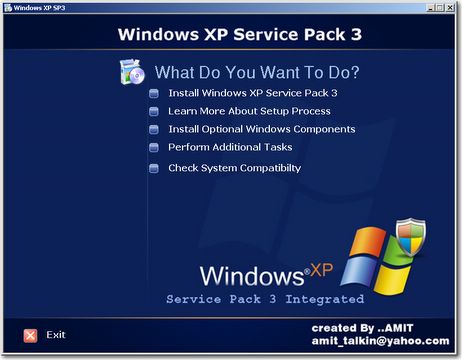
Putting all rumors to rest, Microsoft today confirmed that Windows XP Service Pack 3 is very much under development and will be available later this year.

Windows XP Service Pack 3

The Windows Service Packs roadmap still says that XP SP3 is planned for release in 2008 but a new press release from Microsoft announcing a deal with Juniper Networks ends all speculation related to the release of XP SP3. It says:
Microsoft is announcing that Windows Vista supports this protocol today and Windows Server 2008 and Windows XP Service Pack 3 (SP3) will support it as well later this year.

Customers running Windows Vista or Windows XP SP3 will be able to easily realize the benefits of a Juniper UAC deployment without requiring the need to deploy additional client software.
I think XP SP3 will primarily be a bug-fix release integrating all the patches and hotfixes released by Microsoft since XP SP2.

Don't expect a new version of Windows Media Player or Photostory or Windows Movie maker inside XP SP3 as Microsoft have shifted focus on Vista but still, XP SP3 should ease the life of sysadmins in organizations that are still on Windows XP.

Related: Autopatcher XP, Slipstream Windows XP SP2, Windows XP SP3 Unattended

Windows XP SP3 Patch

Update: The information about the XP SP3 release date mentioned in the press release is inaccurate. This was conveyed to Mary at ZDNet by a Micrsoft representative:
"I just received additional information from the product manager responsible for SP3... Please do reference this link for current timing and disregard the release from InterOp, which is inaccurate."
Microsoft has atleast confirmed that they have a product manager for developing XP Service Pack 3. That should keep the hopes alive for XP users.

Send Large Attachments in Microsoft Outlook via YouSendit Plugin, Track File Delivery

You probably know that YouSendit, like Rapidshare or Megaupload, allows you to transfer large file attachments via email indirectly - upload the file to YouSendIt.com and email the link provided by YouSendIt to your friend.

Email Large AttachmentsFiles as large as 100 MB can be shared over YouSendit for free and upto 2 GB if you are a paying customer.

YouSendIt now offers a better option for Microsoft Outlook uses - they have released a free Outlook add-on that will help you email large files from Outlook directly via YouSendit.

As you attach a file with your Microsoft Outlook email message, Outlook will automatically send that file using the YouSendIt service. The YouSendIt icon in the system try will indicate the current upload status of the file.

One big advantage here is that YouSendIt tracks file delivery and the sender will now know exactly when files have been received at the client side.

In addition to Outlook, Yousendit has similar plugins for Corel Draw X3, Adobe Photoshop and Apple Aperture.

YouSendIt Plug-ins and Applications

Related hack: Know when your email gets read

Technorati Blog Search Engine Moves to search.technorati.com

The gist is that Technorati is not a blog search engine anymore.

Technorati website sports a new refreshing look today. There's a new a scrolling ticker at the top that displays the current hot tags and search on Technorati.

Technorati Design
Other than the new design (which reminds me of the Indian Flag), Technorati has repositioned themselves as a media search engine that helps you search through pictures, videos and music in addition to blog posts.

If you are looking to search for only blog posts on technorati, bookmark their new site at s.technorati.com. Dave has more details on the changes at Technorati.com

They have added a Widget Library which is actually a directory of all browser plugins / bookmarklets and widgets related to Technorati. The layout looks much cleaner and not confusing as before.

Technorati Blogs
Going forward, it may not be fair to compare Google Blog Search with Technorati. Blog search is now just a subset of what Technorati has to offer.

Related: India Blogs Search Engine

Tuesday, 22 May 2007

Adobe Visual Communicator 3 - Download up on Adobe Labs

Adobe Visual Communicator 3 is a video presentation software for creating video podcasts, training videos or even corporate presentations.

The software is not a video editor like Adobe Premiere but can help you create professional looking video presentations in minutes that look like television quality broadcasts (provided you have a decent webcam or camcorder and sufficient lights).

Place the supplied green screen behind you (it supports chroma keying), look at the teleprompter and start narrating. Adobe Visual Communicator can output video as Flash video (FLV), Windows Media, or Real player format.

Adobe Visual Communicator 3
But there is some good and bad news. The good news is that Adobe has posted the next interation of Visual Communicator 2.5 on Adobe Labs that anyone can download for free.

And the bad news is that this Visual Communicator 3 installer runs over 2 GB so most users cannot try it even if the software is free during the beta period.

Adobe Visual Communicator 3 will be shipping in the summer of 2007. Till then, you can download on Adobe Labs for free provided you are on good internet connection.

More details on Adobe Labs and Adobe.com

Wish Adobe had stripped the VC3 installer of all extra music clips, images and video to reduce the file size so that more prospective video podcasters would have explored the software.

Related: Video Blogging with Cockpit, Video Podcasting Software for PC or Mac

Share Pictures, Documents, Music on the Web Without Uploading Them Anywhere

You use Flickr for uploading photographs, Scribd for sharing Office documents, YouTube for video files and Rapidshare or Divshare for uploading Music MP3s and other file formats including .zip and .exe.

Now that's not a bad approach but care to try something very different that would save you from the hassle of uploading stuff on the web ?

Enter Purplenova, a 3MB software that turns your computer into a virtual website.

Host files and documents on your computer
Every file or folder that you share from your computer gets a public URL. Your friends can simply type that URL in their web browser and access the file no matter how large the size is - it will be streamed directly from your computer to his/her machine.

Purplenova is like turning your computer into a web server (with an internet address) sans any complex setup. Just run the utility, choose the local files or folders that you like to share over the web and Purplenove will give you a URL for each of them that you can paste in your email or blog.

There are some interesting application of Purplenova - you can access files located on your home computer from office or vice versa. You can also listen to streaming music on another computer from your Windows Media player.

They are integrated with Google Analytics to provides you with stats about file usage. Think of Purplenova as extremely simple web hosting from your desktop with absolutely no limits on storage space or bandwidth constraints.

PurpleNova.com | Download Purplenove 3.0 | FAQ

Unlike screen sharing software like Yuuguu or SharedView, Purplenova does not give other remote access to your computer, it delivers files only through the web browser.

Create Web Forms Online; Embed Them in Your Blog

FormLogix is an online HTML forms designer that will help you create web forms fast and easy inside a WYSIWYG environment.

Whether you want to build email contact forms, feedback forms, or online surveys - you will find FormLogix useful. It will also host the HTML forms for you.

FormLogix has an intuitive design interface where you simply drag-n-drop the form elements (like textbox, radio buttons, etc) on the canvas without having to write any HTML - the forms still look stylish and beautiful.

Free HTML Forms
They have a neat template gallery with forms for people who are too lazy to design a form from scratch. Once your form is ready for use, you can embed it inside your blog or website using simple Javascript code or as an IFRAME.

Every element / attribute of the form is customizable including fonts, background colors, borders, form dimensions (height / width), etc. Hence they integrate well in your existing website.

When a site visitor populates the form with data and clicks the Submit button, you get the contents in an email the format of which is quite similar to new comment notifications in Wordpress. A copy of your form submission is also stored online.

FormLogix will also provide a webpage for your HTML form that you can link in your email signatures or share in message boards - the chances of receiving email spam are thus reduced since you no longer have to share your actual email address on the list but other members can still get in touch with.

FormLogix.com | Form Templates | Contact Us Form [sample]

Related: Generate a Contact Us Form With Your Email Address

Larry Page, Marissa Mayer and the Google Book Scanner

Google Book Scanner
Google Book Search, which allows you to search text from around a million books that have been scanned by Google, has an interesting history.

Though Google Book Search made a public debut in 2004 as Google Print, the seeds of this book scanning project were sown in 2002 inside Larry's office when he and Marissa scanned the first paper book manually using a digital camera.

Larry took pictures of the book pages with his camera while Marissa flipped the individual pages after every shot. The Google duo could scan all the 300 pages of that book into PDF format in full 40 minutes.

They used a metronome, a practice tool for musicians, to maintain a steady duration between two consecutive shots.

This interesting story, mentioned in the Google Book Search history page, was also by Marissa during her keynote address at the Acrobat PDF conference.

Well, that was just the prototype. Today, Google is scanning more than 3,000 books per day according to NYT.

Related: Turn a Camera into a Book Scanner

CBS Video Clips on Joost and AOL, WallStrip goes to CBS

Wallstrip creator Howard Lindzon has finally broken his silence on the CBS rumor.

Howard just announced that Wallstrip, the daily video podcast on stocks with a tinge of humor, has been acquired by CBS for an undisclosed amount.

Lindsay Campbell
[Lindsay Campbell in the Wallstrip Studio (Manhattan), Credit: NYT]

Liz Gannes adds that host Lindsay Campell and producers Adam Elend / Jeff Marks will become full-time employees of CBS, and Lindzon will play a consulting role. Congrats Fred and Feld.

So there is scope for monetization of video podcasts provided the content is produced in a professional manner and the delivery schedules are maintained.

CBS already has some good experience with video podcasts - the CBS Evening News video podcast with Katie Couric is syndicated daily.

Related: RocketBoom with Lindsay Campbell on WallStrip

Reuters says that CBS plans to syndicate most of their video content on the web.

AOL and Joost will soon carry the video content of CBS while CBS is also working with sites such as Facebook and Last.fm Ltd. to allow users to post its video clips to their profiles.

Rocketbook guru Andrew Baron is naturally excited especially with that unconfirmed $5 million price tag. He says - "This evaluation is great news for Rocketbooom and others in our field... it looks like Rocketboom spends just a fraction of what Wallstrip spends.

Lindsay visits the CBS heardquarters but the security guards won't let her in. Watch the video recording on Youtube.


Staci Kramer adds that Howard Lindzon becomes an "active consultant" while writers/producers Adam Elend and Jeff Marks will executive produce original video content for the division (CBS-Wallstrip) and Lindsay Campbell continues as the program's host.

Monday, 21 May 2007

Make Money by Using Blogger - $100 per hour

Work from Home for GoogleHere's an opportunity to make some decent money from blogs - you do not have write a blog on Blogger, just test the new upcoming features of Blogger and provide your feed to Google.

Google is willing you to pay upto $100 per hour for this job. You can work from anywhere in the world, but need to have a computer and a good internet connection.

A Google researcher will call you while you sit at your computer, and ask you to try out a Google product or prototype via your internet connection, and give feedback on it.

Google routinely invites people to test Google Software (on paid basis) and they have conducted Blogger Usability Study earlier but that was confined to residents of New York City and San Francisco Bay Area.

Sign-Up for Blogger Study

Related Jobs: Work from Home for Google [Adwords Quality Rater]

Google Adsense Sandbox - Online Adsense Preview Tool


Adsense Sandbox 1.0 - We have just launched a new online tool for Adsense publishers that shows the latest ads available in Google inventory for particular keyword(s) or webpage URLs.

Unlike the official Google Adsense Preview tool which is only available as an IE add-on, the Adsense Sandbox works across all browsers and supports all Google ad formats including Adlinks and Rich Media Google Ads (Images, Video or Flash).

The tool can also help you determine what kind of Google Ads are being served on your web pages for visitors who are coming from other countries like China, Brazil or Japan.

Since the Adsense Sandbox tool uses random Adsense Publisher IDs, advertisers are not charged by Google for ad impressions or ad-clicks generated though this tool.

You can watch this short Screencast Video on YouTube.com for a quick tour of Adsense Sandbox. Give it a try.

Adsense Sandbox 1.0

Want More Friends on Facebook ? Add Contacts from Outlook, GMail, Yahoo, etc

Are you on Facebook ? Don't be too surprised if you are getting tons of new friendship requests in your email inbox daily from other members of Facebook.com.

Like Tagged and other social networks, Facebook too has added a "mass invite" feature allowing members to import and invite all email addresses from their Yahoo, Hotmail, AOL, Gmail or MSN address book in one click.


This feature may have existed in Facebook for some time but now they are promoting it very prominently on the homepage so Facebook members are more likely to explore it.

Maybe the sole motive here is to increase the Facebook subscriber count but such features are often misused. If are finding it tough to handle the email invitation load from Facebook members, your best bet is to disable email notifications that reach you when someone adds you as a friend on Facebook.

Of course your queue with pending friendship requests will still grow on the Facebook website.

Mass Invite Your Friends | My Facebook Profile

Convert HTML Web pages to JPG Images or PDF Documents

Total HTML Converter can convert HTML webpages into virtually every file format including JPG pictures, Word Documents, Adobe PDFs or even Excel Spreadsheets.

You can also use this tool to extract plain text from HTML web pages. The utility supports batch conversion allowing your to transform any number of HTML files into other formats at the click of a button. Geeks would love the command line support.

convert html to pictures
Total HTML Converter supports different charsets and encoding tables and can fit HTML Width to the chosen PDF-Page-Size.

Total HTML converter costs around ~$40 but you can have this useful HTML conversion tool for free providing you start your downloading engines within the next 24 hours.

Download Total HTML Converter at Give Away of the Day for free. No watermarks.

Related: Convert PDF, Office Documents to HTML, Screen Capture Webpages in Firefox

Friday, 18 May 2007

Browser Bookmarks (or Favorites) As Popular As del.icio.us

A lot of users still use the traditional favorites system of web browsers to bookmark websites that they find interesting.

AddThis, a free service that allows visitors to bookmark webpages on social websites, today released an interesting report that showcases the current trends in social bookmarking.


While Google Boorkmarks, del.icio.us, Yahoo! MyWeb are the most popular places for saving bookmarks, local bookmarking is at an impressive third-place and nearly as popular as the del.icio.us system.

If you provide users with an easy option, they are more likely to put your content in their local bookmarks folder.

Here are detailed instructions on adding the "Bookmark the website" or "Bookmark the web page" link to your blog on Wordpress, Blogger or MovableType. The code should work on IE, Firefox and Opera.

AddThis Report [Thanks Darren]

Dell Tablet PC Screenshots, Coming Later this Year

Dell Tablet PC
Dell Senior Vice President Jeff Clarke has just confirmed that Dell Tablet PC is coming later this year.

The Latitude Tablet PC from Dell is designed for the education sector, health care and corporate. It's a convertible notebook, lightweight and runs on Windows Vista.

While Jeff did not reveal the configuration or other features of Dell Tablet PC, the unit looks impressive in the video.

Related: HP Pavilion tx1000 Tablet PC

Uploading Photographs, Screenshots or Illustrations ? Flickr Wants To Know

Flickr Picture URLsFlickr is asking users to specify the kind of content that they are uploading to Flickr servers.

When you upload a new image to Flickr, you need to specify whether it's an art-work, photograph taken from a camera or a computer screenshot.

Flickr is also asking users to assign movie-style ratings to their photographs at the time of upload. The picture ratings can be Safe (G), Moderate (PG, PG-13) or Restricted (NC-17) - (though Flickr won't allow Porn pictures, nude images are permitted and hence the Restricted rating)

Flickr Screenshot
It is important that you set the content type else your pictures may not turn in the Flickr search engine or users may not be able to view them without logging into Flickr.

If doing this for each picture sounds too much effort, Flickr has a simple page where you can set the general preferences for your pictures. Later, when you upload a picture of different type, just specify that at the time of uploading.

Tip: If you have reached flickr while looking for screenshots, goto the advanced search page, deselect photos and select "screenshot" in the search option. That should give pretty relevant results.

Flickr URLs - Dissecting the web address of Flickr Pictures

Related: Shoot and Upload Screenshots to Flickr